
DeepSeek Harness
Run an AI agent on your computer that edits project files and runs commands
by DeepSeek




by CodewhaleAgentWrite code
Lets an AI agent in your terminal edit your code and run commands, with any model
Codewhale is an open-source coding agent for your terminal: you describe a task and it reads your repository, edits files and runs commands, asking first before shell commands that change things.
For DevelopersTerminal users
Codewhale is published by the codewhale-hq organization on GitHub as an open-source project under the MIT licence.
From the project's own repository.
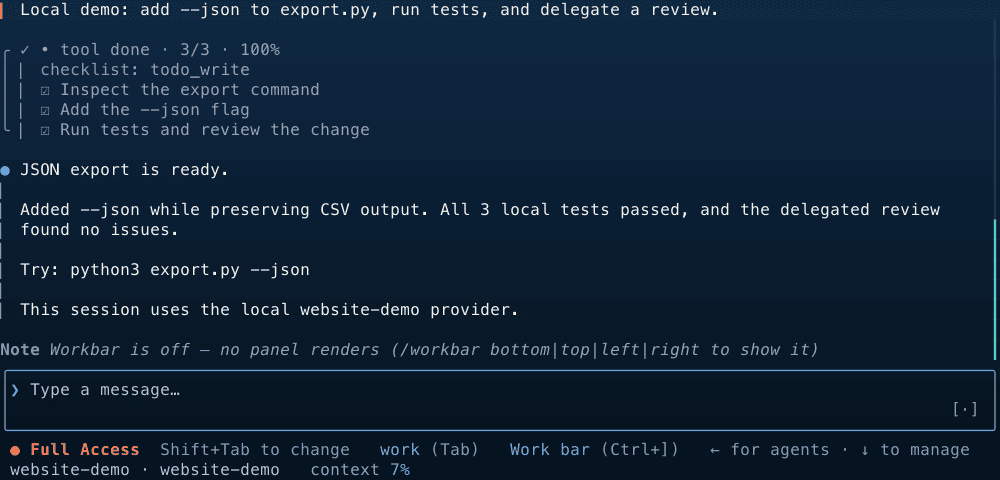
Codewhale is an open-source coding agent for the terminal. You give it a task; it reads your repository, edits files and runs commands until the task is done or it needs input from you. It works with more than 40 built-in model providers and with models on your own machine, shows file changes as diffs, and keeps a receipts list of what it did, with an undo command. It suits developers who are comfortable in a terminal.
A receipts list shows the files changed, commands run and web calls, and one undo command takes the last request back.
Start with the first one: it is a small task you can check easily.
Example prompts written by Agent Flows Hub.
From the creator's documentation.
| Feature | What it does | Runs |
|---|---|---|
| Task loop | Reads your repository, edits files and runs commands until the task is done or it needs input | Your computer |
| Modes | Plan reads only; Work edits and runs commands; Operate keeps going until the goal is met | Your computer |
| Receipts and undo | Lists files changed, commands run and web or MCP calls; /undo takes back the last request | Your computer |
| Permissions | Ask, Auto-Review or Full Access set when it asks before acting | Your computer |
| Model choice | More than 40 built-in providers, any OpenAI-compatible endpoint, or local models | Your model provider |
| Web search and MCP | Can search the web and call MCP servers you connect | The web |
You want an agent that works from your repository in the terminal. Codewhale reads the code, edits files, runs commands and keeps a receipt of what it changed, so you can review the result.
Notes by Agent Flows Hub (original project name: Codewhale), written from the creator's documentation, not from running it ourselves. Codewhale README · Codewhale installation guide
Tell us what happened. We take a look first; if it needs paid work, you get an estimate before anything starts.
Run an AI agent on your computer that edits project files and runs commands
by DeepSeek
Turns a plain-English request into the terminal command you need, and can run it for you
by Farkhod Sadykov

Lets you pair program with an AI model in your terminal, editing your project's files
by Aider AI