Business Card Reader (Dify)
Reads photos of business cards and lists each person's name, title, phone and email
by LangGenius


by GoogleAppGet organised
Runs AI chat, photo questions and transcription on your phone, with no internet needed
Google AI Edge Gallery is a free app for trying open AI models on your phone or Mac. After a one-time model download you can chat, ask about photos, transcribe audio and more, all on the device.
For Curious phone usersPeople who keep data privateLanguage learners
Google makes it as part of Google AI Edge, its set of tools for running machine learning models directly on phones and other devices.
From the project's own repository.
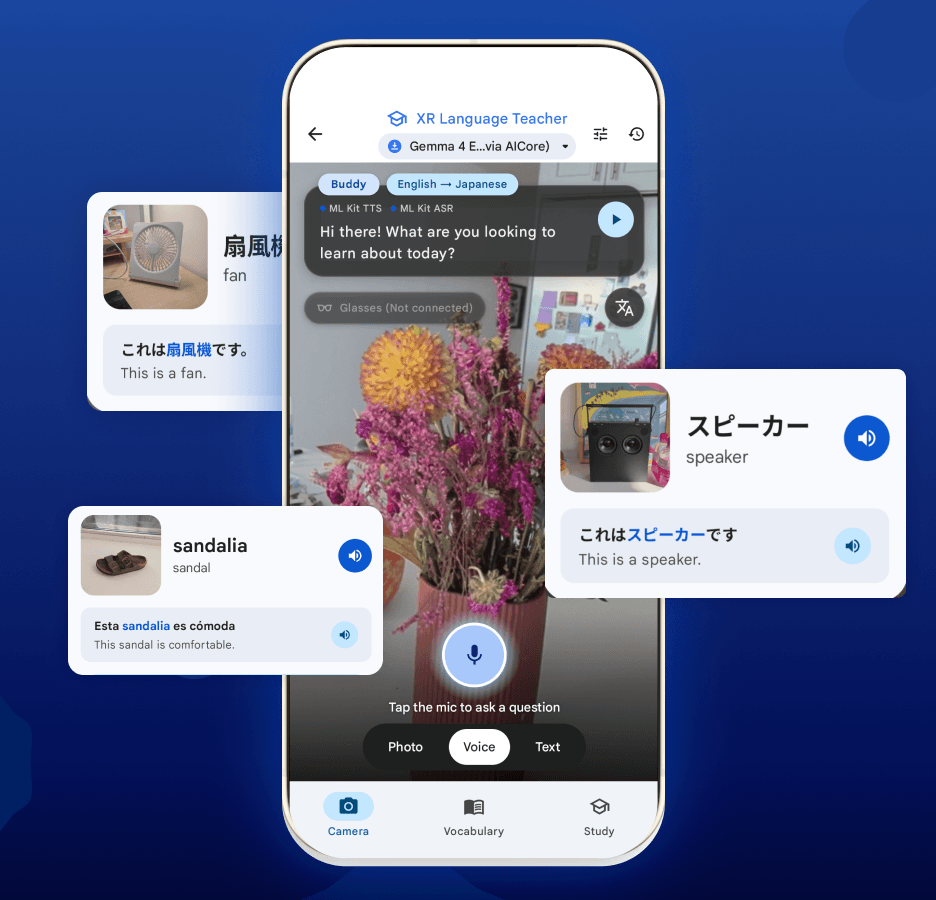
Google AI Edge Gallery is Google's free app for trying open AI models directly on your phone or Mac. You download a model once inside the app, then chat by text or voice, ask questions about a photo, transcribe and translate recordings, search your photos in plain words, or point the camera at objects to learn words in another language. Everything runs on the device, so your prompts and images stay there. It suits curious people who want to try AI offline and privately.
Once a model is downloaded it works without a connection, so you can use AI on a plane or keep private photos off the cloud.
Start with the first one: it is a small task you can check easily.
Example prompts written by Agent Flows Hub.
From the creator's documentation.
| Feature | What it does | Runs |
|---|---|---|
| AI Chat | Chat by text or voice, with answers read aloud | On your device |
| Ask Image | Ask questions about a photo from your camera or gallery | On your device |
| Audio Scribe | Transcribe and translate voice recordings | On your device |
| Photo and video search | Find photos or moments in a video by describing them | Your photo library |
| XR Language Teacher | Point the camera at objects to learn words and save vocabulary cards | Camera |
| Model downloads | Download open models from a list or load your own; needs a connection once | Internet, once |
Use an open AI model on your own phone for chat, photo questions or transcribing a recording, without sending the content to a server. You download a model once in the app and then work offline.
Notes by Agent Flows Hub (original project name: Google AI Edge Gallery), written from the creator's documentation, not from running it ourselves. Google AI Edge Gallery: README and downloads · Google AI Edge Gallery user guide
Tell us what happened. We take a look first; if it needs paid work, you get an estimate before anything starts.
Reads photos of business cards and lists each person's name, title, phone and email
by LangGenius
Lets Gemini CLI read and write your Gmail, Calendar, Drive, Docs, Sheets, Slides and Chat
by Google

Builds a chat assistant that answers questions from your own documents, on your server
by FIT2CLOUD