Claude HUD
Shows context use, usage limits and what Claude Code is doing in a bar under your input
by Jarrod Watts



by Peter SteinbergerAppWrite code
Shows how much of your AI coding limits you have left, right in the Mac menu bar
You are deep in a task when your coding agent says you have hit the limit, and you had no idea you were close.
For Codex and Claude Code usersPeople on several AI coding plans
From the project's own repository.
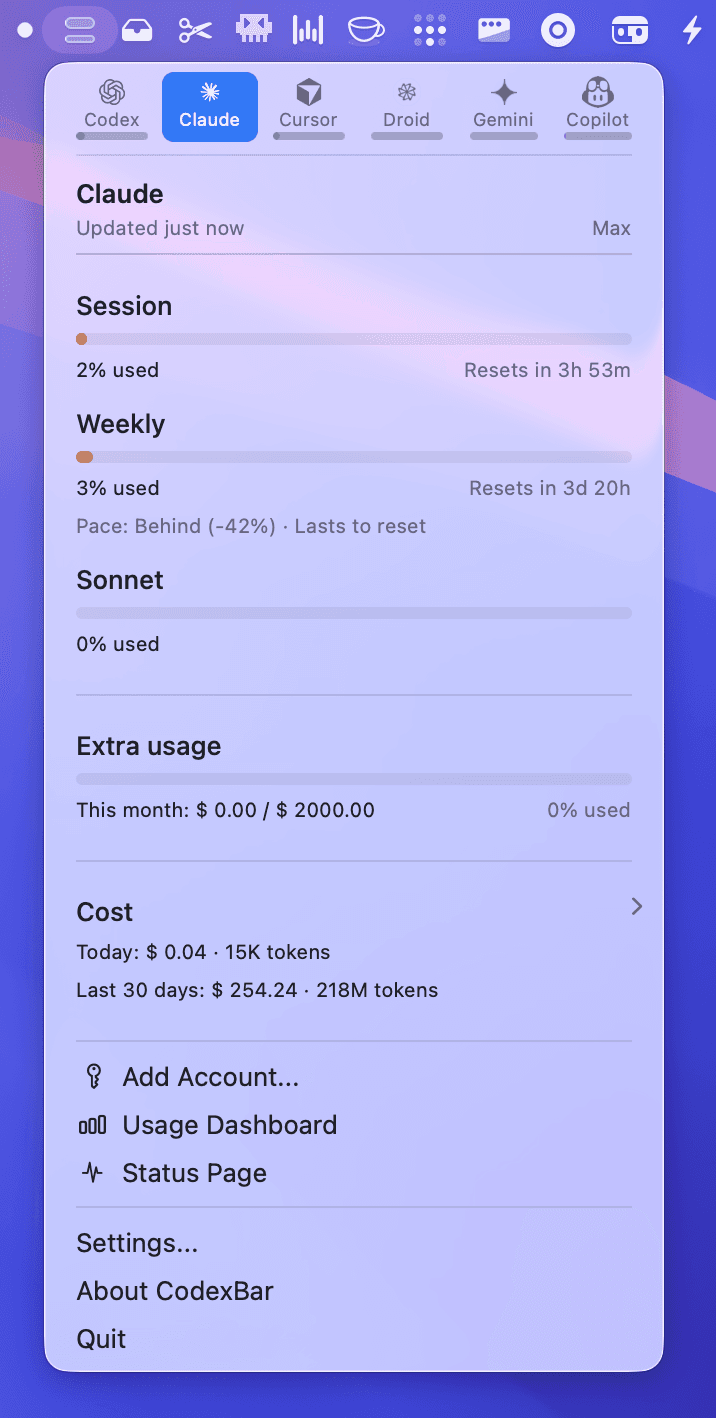
CodexBar is a small open-source menu bar app for macOS 14 or newer, with a Linux desktop version. It shows the usage limits of AI coding tools such as Codex, Claude, Cursor, Gemini and Copilot, with a countdown to each session, weekly or monthly reset, plus credit balances and spend where the provider exposes them. It reuses the sign-ins you already have, so it stores no passwords. It suits anyone who pays for one or more AI coding plans and keeps running into limits.
It puts every plan's remaining allowance and reset time in one glance, so you can decide whether to start a long task now or wait.
Start with the first one: it is a small task you can check easily.
Example prompts written by Agent Flows Hub.
From the creator's documentation.
| Feature | What it does | Runs |
|---|---|---|
| Reset countdowns | Session, weekly and monthly windows with the time to the next reset | Your sign-ins |
| Credits and spend | Credit balances and spend summaries where the provider exposes them | Provider accounts |
| Status badges | Flags provider incidents in the menu and on the bar icon | Provider status pages |
| Local cost scan | Estimates cost from local agent logs on your machine | Your computer |
| Sign-in reuse | Uses existing CLI, OAuth, API key or browser sessions and stores no passwords | Your computer |
You use several AI coding plans and keep hitting limits in the middle of work. CodexBar shows each plan's session and weekly usage with the time until it resets, so you can plan a long task around it.
Notes by Agent Flows Hub (original project name: CodexBar), written from the creator's documentation, not from running it ourselves. CodexBar README: install, providers and privacy · CodexBar website
Tell us what happened. We take a look first; if it needs paid work, you get an estimate before anything starts.
Shows context use, usage limits and what Claude Code is doing in a bar under your input
by Jarrod Watts
Shows your AI coding agents' progress in the Mac notch and lets you approve their steps
by Louis Raillé

Shows how many tokens your coding agents used and what that would cost, day by day
by ryoppippi