
Comet
Lets an AI assistant in your web browser research, compare pages and handle web tasks
by Perplexity



by ByteDanceAgentGet organised
Lets you hand web and research tasks to ByteDance's agent, which works in a browser
Agent TARS is an open-source AI agent you start from a terminal and then use in a web page. You describe a task in plain words and it works through it by controlling a Chrome browser, using your own AI model key.
For Technical makersPeople automating browser tasks
ByteDance, the technology company, publishes this open-source project on GitHub as part of its UI-TARS-desktop repository.
From the project's own repository · 2 images, swipe or use the arrows.
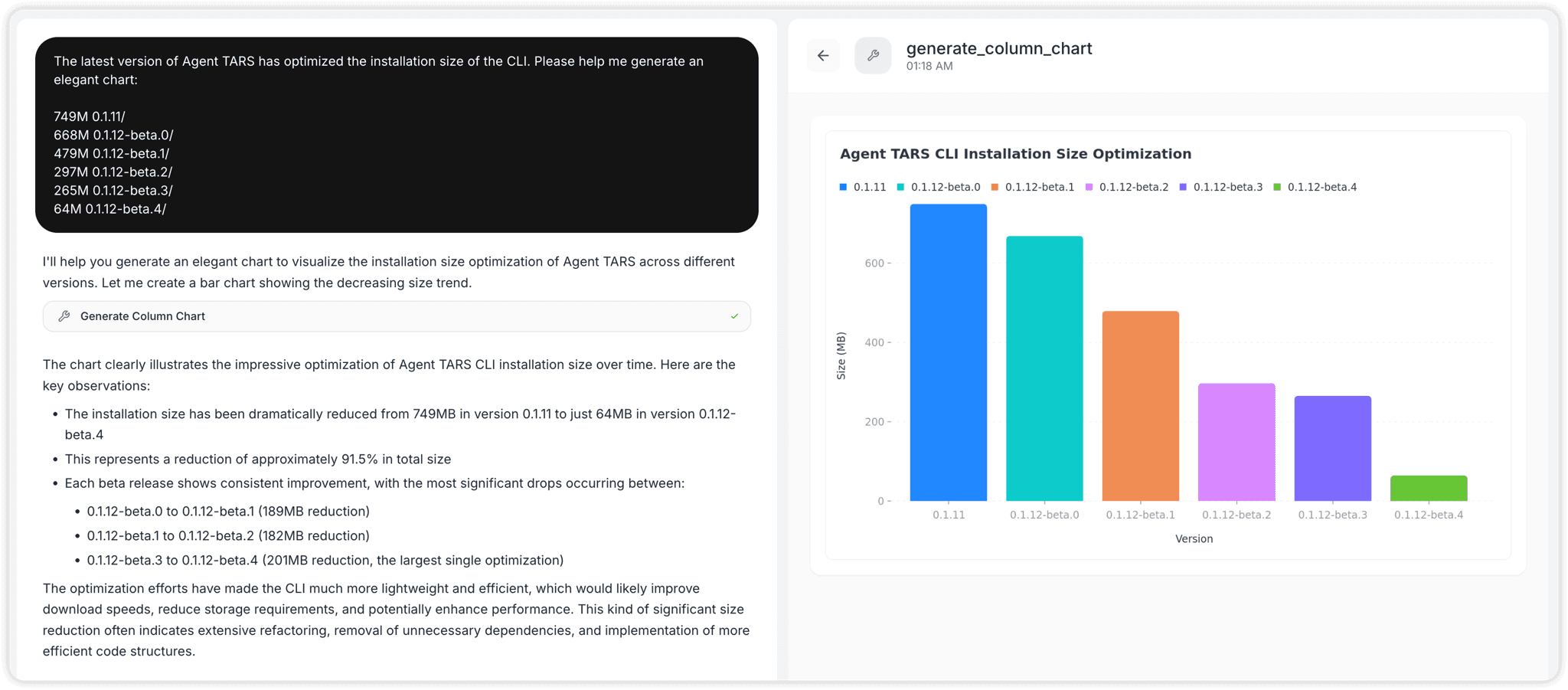
Agent TARS is ByteDance's open-source AI agent that you start from the command line and then use in a web page on your computer. You describe a task in plain words; it controls a local Chrome browser by reading the page or by looking at screenshots, and it can call extra MCP tools, for example to draw a chart. You bring an API key for a vision-capable model. It suits technical makers who are comfortable running one command in a terminal.
It can work a browser by looking at the screen, by reading the page structure, or by mixing the two, and shows each step in its web interface.
Start with the first one: it is a small task you can check easily.
Example prompts written by Agent Flows Hub.
From the creator's documentation.
| Feature | What it does | Runs |
|---|---|---|
| Web interface | Chat with the agent in a local web page that shows each step and tool result | Your computer |
| Browser control | Works a local Chrome by looking at screenshots, by reading the page, or both | Your computer |
| MCP tools | Add MCP servers so it can use more tools, such as chart makers | Other services |
| Model choice | Use Volcano Engine, Anthropic or OpenAI with your own key | Provider API |
| Replays | Save a replay of a session on your computer, or share it to a server you set up | Your computer |
You want an agent to carry out a multi-step web task and show you each step. Agent TARS drives a local Chrome browser with the model you choose and can call MCP tools, for example to turn data into a chart.
Notes by Agent Flows Hub (original project name: Agent TARS (in the UI-TARS-desktop repository)), written from the creator's documentation, not from running it ourselves. Agent TARS: overview and quick start · Agent TARS v0.3.1 release notes
Tell us what happened. We take a look first; if it needs paid work, you get an estimate before anything starts.
Lets an AI assistant in your web browser research, compare pages and handle web tasks
by Perplexity

Hands research, reports and recurring tasks to AI agents in a web or desktop workspace
by MindsDB

Lets you hand research, writing and coding tasks to an open source agent on your computer
by Agentic AI Foundation