MiniMax Music 3 Text to Music
Makes a full song with vocals from your lyrics and a style description on your computer
by Comfy Org



by Anjok07AppMake video or audio
Splits a song into a vocal track and an instrumental track on your own computer
You want to sing over a song, or need just its backing track for a video, and the only instrumental you can find is a muddy upload.
For Musicians and singersKaraoke and cover makersVideo editors
From the project's own repository.
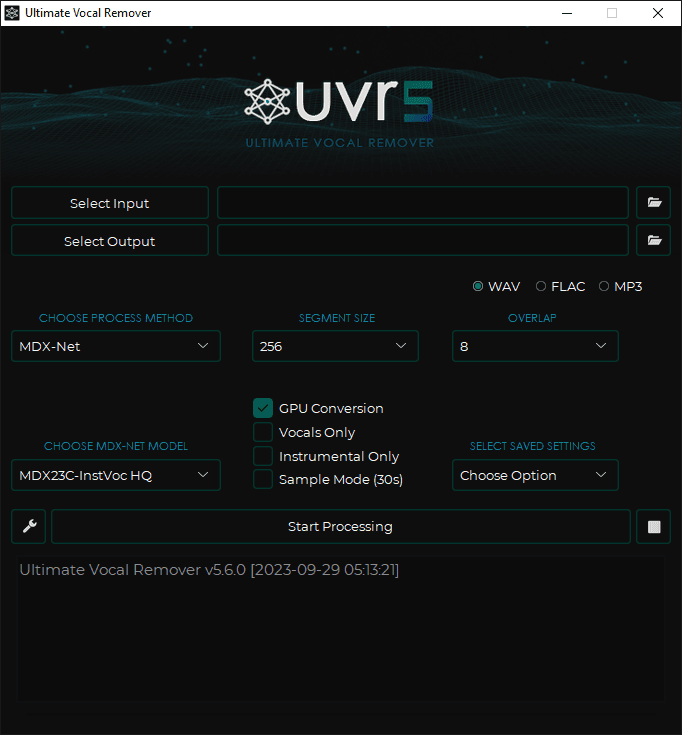
UVR is a free desktop app that uses AI separation models to pull the vocals out of an audio file. You pick a song, choose a model and press Start Processing; it saves the vocals, the instrumental or both as WAV, FLAC or MP3 files. It runs on your own computer, with installers for Windows and Mac and a source install on Linux. It suits musicians, karaoke makers, video editors and anyone who needs a clean backing track or an a cappella.
Most of its separation models come from its own developers and ship inside one free app, so you need no paid web service and no coding to split a track.
Start with the first one: it is a small task you can check easily.
Example prompts written by Agent Flows Hub.
From the creator's documentation.
| Feature | What it does | Runs |
|---|---|---|
| Vocal and instrumental split | Saves the vocals and the backing music of a song as separate audio files | Your computer |
| Several model families | Choose VR Architecture, MDX-Net or Demucs models, including Demucs four-stem models | Your computer |
| Output formats | Write results as WAV, FLAC or MP3 | Your computer |
| Sample Mode | Process only 30 seconds to check a setting before running a whole track | Your computer |
| Pitch and tempo tools | Change the pitch or stretch the timing of a track | Your computer |
| GPU conversion | Faster processing on a supported Nvidia card or an Apple-silicon Mac | Your computer |
Separate the vocals from the backing music of an audio file you are allowed to use, for a karaoke track, a remix stem or a backing track for a video. You choose a separation method and model, and the app writes the separated parts as new audio files.
Notes by Agent Flows Hub (original project name: ultimatevocalremovergui (UVR)), written from the creator's documentation, not from running it ourselves. UVR (ultimatevocalremovergui): README and installation · UVR development update (issue 2399)
Tell us what happened. We take a look first; if it needs paid work, you get an estimate before anything starts.
Makes a full song with vocals from your lyrics and a style description on your computer
by Comfy Org

Turns text into speech, cloned voices and songs on your own computer, with no API fees
by leemysw
Helps you write song lyrics and prompts for AI singers like Suno
by Nous Research