Taste Skill
Gets your coding agent to design web pages with an art direction, not a template look
by Leon Lin


by Zhihuang LinSkillMake visuals
Helps your agent design web pages and app screens, and compare directions side by side
A design skill for Claude Code, Codex and other AI agents. Describe a page; it recommends one design direction and builds it, or builds several to compare side by side, then checks screenshots at desktop and phone sizes.
For Founders and indie makersDesignersPeople building websites or apps
An open-source project by Zhihuang Lin (GitHub account oil-oil), under the MIT license. A paid version, Oil UI Pro, is also offered; the project site is ui.oiloil.org.
From the project's own repository.
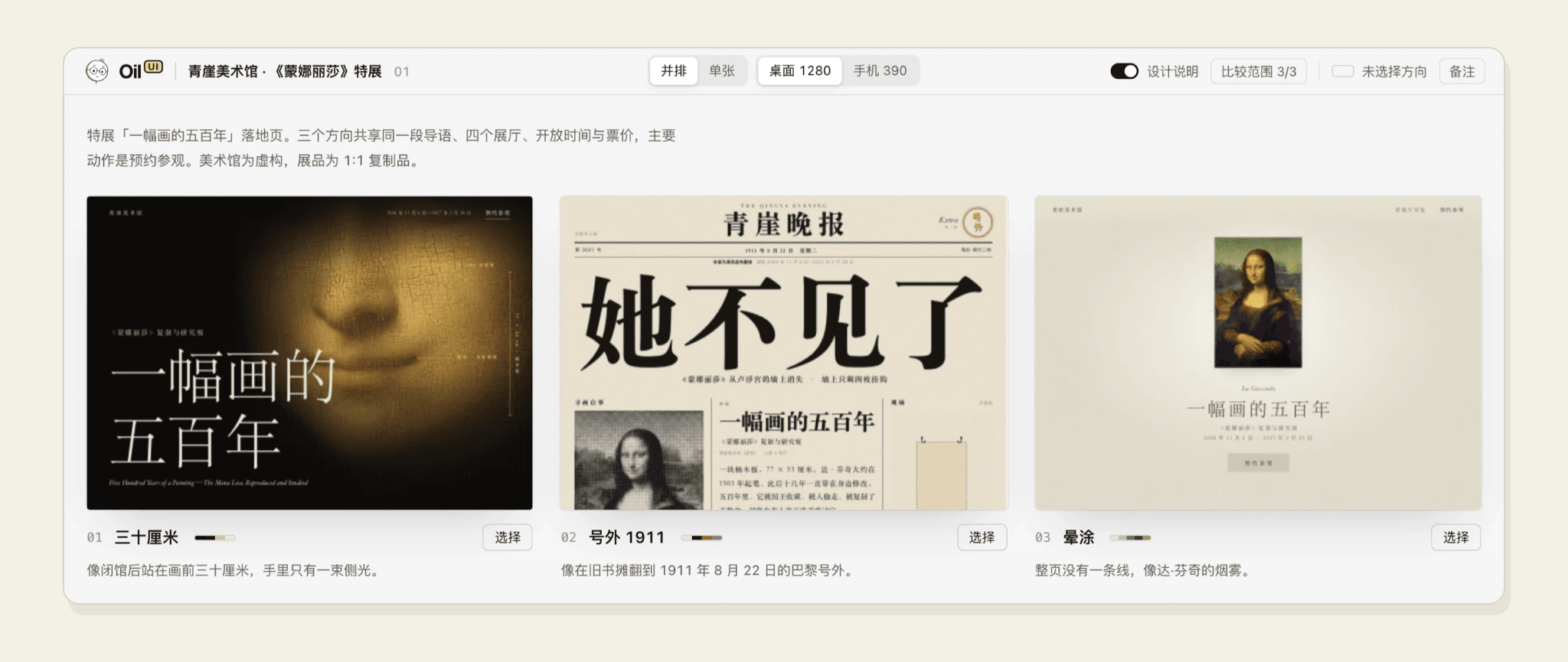
Oil UI is a design skill that teaches your agent how to plan an interface before building it. You describe a product, page or component; it studies similar products, recommends one design direction and builds it, or makes several to compare on one page when you ask. It then checks screenshots at desktop and phone sizes and trims what does not help. It suits founders, makers and designers who want a page that does not look like every other AI-made site.
Its comparison page puts several designs side by side with a Select button, so you choose with your eyes instead of describing taste in words.
Start with the first one: it is a small task you can check easily.
Example prompts written by Agent Flows Hub.
From the creator's documentation.
| Output | What it is | Reads |
|---|---|---|
| Design direction | Names the product category, looks at distinctive peers and recommends one direction | What you describe |
| Comparison page | Puts several designs side by side, with desktop and phone sizes and a Select button | Your project files |
| Screenshot checks | Opens finished pages at desktop and phone sizes and inspects the screenshots | Your computer |
| Screenshot recreation | Rebuilds a page from a screenshot you provide | Your project files |
| Design review | Explains what to change on an existing page without editing it | Your project files |
| Update check | Looks for a newer version online at most every 10 minutes; nothing from your project is sent | ui.oiloil.org |
Ask for a new landing page, app screen or component and let the skill pick a direction from the product's category and audience, then build and screenshot it. Ask for a comparison when you want several distinct directions on one page.
Notes by Agent Flows Hub (original project name: oil-ui), written from the creator's documentation, not from running it ourselves. Oil UI: README and installation · Oil UI: gallery and Pro comparison
Tell us what happened. We take a look first; if it needs paid work, you get an estimate before anything starts.
Gets your coding agent to design web pages with an art direction, not a template look
by Leon Lin

Lets you describe a web page or app screen and watch an AI draw the design on a canvas
by ZSeven-W
Helps you choose color palettes, type scales, grids and layouts for app or web screens
by MC Dean